Friday, March 6, 2026
Home Blog Page 38

Dell Inspiron 16 2-in-1 Review: Keeping It Classy

0
Dell Inspiron 16 2-in-1 Review: Keeping It Classy

[ad_1]

Dell’s Inspiron range of laptops has long been a popular choice for many buyers thanks to its approachable pricing and features. The company’s new 16-inch series of Inspiron laptops aims to deliver a more premium experience for productivity and entertainment. We have with us today the Dell Inspiron 16 2-in-1 laptop which boasts of a taller 16:10 aspect ratio display, four speakers, and the ability to unfold into a tablet. Dell is pitching it as an entertainment and productivity solution, so let’s see if it achieves that goal.

Dell Inspiron 16 2-in-1 price in India

The Dell Inspiron 16 2-in-1 starts at Rs. 1,00,990 in India for the base variant, which has an Intel Core i5 CPU, 8GB of RAM, and a full-HD resolution display. The other configuration is priced at Rs. 1,40,990 and this gets you an Intel Core i7 CPU, 16GB of RAM, an Nvidia GeForce MX550 GPU, and a 4K resolution OLED display.

dell inspiron 16 2in1 lid gadgets360 ee

The metal body of the Dell Inspiron 16 2-in-1 looks and feels premium


Dell Inspiron 16 2-in-1 design

The Dell Inspiron 16 2-in-1 has a minimalistic design and looks slick in the Platinum Silver colour. The back of the metal lid is plain with just a Dell logo etched on the surface. It is a heavy laptop, weighing a little over 2kg, and it takes up a lot of space on a desk or in a backpack. Even so, Dell has managed to keep the thickness under 20mm so it doesn’t feel like you’re carrying a thick slab of metal in the hand.

The sides of the Dell Inspiron 16 2-in-1 are very angular but have soft edges so nothing really digs into your skin when using it. The base of the laptop has ports on either side, and these include a full-sized SD card slot, two USB 3.2 (Gen1) Type-A ports, a headphone jack, HDMI 1.4 (up to 1080p 60Hz output), and two Thunderbolt 4.0 ports.

The palm rest area is large and spacious and the same goes for the trackpad. Despite the size of this laptop, you don’t get a full keyboard layout, but the keys are spaced well and the backlighting is easily visible through the grey keycaps.You get two large speaker vents on either side of the keys, similar to Apple’s MacBook Pros. The power button also houses a fingerprint sensor, and the higher-end variant comes with an infrared camera for Windows Hello authentication.

dell inspiron 16 2in1 ports gadgets360 ww

You get a decent number of ports on the Dell Inspiron 16 2-in-1


The 16-inch display looks massive up-close and is taller than the usual 16:9 aspect ratio. It supports touch input, and has a 60Hz refresh rate and a full-HD (1920×1200) resolution. The display is rated to deliver up to 300 nits of brightness, which seems more than adequate for home use. The display bezels on the left and right are thin but the top and bottom are slightly thicker. There’s a 1080p webcam above the display with a physical privacy shutter. The bottom of the display has a fabric layer which covers the two front-firing speakers.

The base variant of the Dell Inspiron 16 2-in-1 which was sent for this review ships with only a 65W power adapter and some documentation. You’ll need to buy Dell’s stylus separately if you wish to use it with this laptop.

Dell Inspiron 16 2-in-1 specifications and software

The Dell Inspiron 16 2-in-1 comes with Intel’s 13th Gen CPUs and this base variant has an Intel Core i5-1335U processor with 10 CPU cores. There’s 8GB of LPDDR5 RAM and 512GB of PCIe NVMe SSD storage. The laptop also features a 6-cell, 86WHr battery, Wi-Fi 6E, and Bluetooth.

The laptop ships with Windows 11 Home and comes with some of Dell’s own apps preinstalled such as SupportAssist and MyDell. You also get a full license for Microsoft Office Home and Student 2021 and a 15-month subscription to McAfee Antivirus.

dell inspiron 16 2in1 tent gadgets360 ee

Tent mode is convenient if you need to watch content and save some desk space


Dell Inspiron 16 2-in-1 performance and battery life

The performance of the Dell Inspiron 16 2-in-1 during this review was very good. The large vents on the bottom and between the two hinges ensure there’s good airflow in and out of the system. The laptop ran silently and cool with most casual tasks, and I only heard the fans when performing intensive tasks such as running benchmarks and gaming. Since this is a convertible laptop, you can use it in a variety of positions. Tent mode is something I used often when watching video content and if I wanted to save some desk space. The only issue I faced was volume control, which required using the touchscreen since there aren’t any physical buttons on any side of this laptop. 

Video looks great on the large display, however reflections can sometimes be an issue. The speakers sound very good and produce clean highs and decent bass, although I felt that the maximum volume could have been better. This variant of the Dell Inspiron 16 2-in-1 isn’t really designed for gaming since it only has onboard graphics, but you can still play casual games from the Microsoft Store. Webcam quality is decent but the picture gets grainy in low light.

The Dell Inspiron 16 2-in-1 posted strong benchmark scores relative to its configuration. Cinebench R20 returned 631 and 3,056 points in its single- and multi-core tests. PCMark 10 returned 4,915 points, while 3DMark Time Spy managed 1,351 points. Results from real-world tests were good too. It took just 56 seconds to encode a 1.3GB AVI file to H.265 MKV, while the BMW test scene in Blender took 7 minutes, 4 seconds to render.

dell inspiron 16 2in1 hinge gadgets360 ww

The Dell Inspiron 16 2-in-1 runs cool for the most part thanks to good airflow


Battery life of the Dell Inspiron 16 2-in-1 was pretty stellar. The laptop conforms to the Intel Evo platform, which guarantees a certain level of performance and all-day battery life. The laptop ran just shy of four hours in the Battery Eater Pro test, which is a solid number and well above average. This translates to very good real-world battery life too, and I was generally able to average a good eight to nine hours of usage, while taking a few short breaks in between.

Verdict

The Dell Inspiron 16 2-in-1 is a well-built and good performing convertible laptop which also delivers great battery life. It’s a little too expensive, but it’s a convertible and has a touchscreen display, so if you don’t really need these features then you should look at the standard Inspiron 16. Other 16-inch laptops with a similar configuration are also generally less expensive. I feel that at this price and configuration, Dell should have bundled a stylus along with the laptop. There aren’t many other negative points for the Inspiron 16 2-in-1, other than the fact that it’s a little cumbersome to carry around and perhaps physical volume buttons on the side would have been convenient when using it in other modes.


Samsung launched the Galaxy Z Fold 5 and Galaxy Z Flip 5 alongside the Galaxy Tab S9 series and Galaxy Watch 6 series at its first Galaxy Unpacked event in South Korea. We discuss the company’s new devices and more on the latest episode of Orbital, the Gadgets 360 podcast. Orbital is available on Spotify, Gaana, JioSaavn, Google Podcasts, Apple Podcasts, Amazon Music and wherever you get your podcasts.
Affiliate links may be automatically generated – see our ethics statement for details.

[ad_2]

Source link

Samsung Galaxy Z Fold 5, Galaxy Z Flip 5: Unpacking Samsung’s Latest Upgrades

0
Samsung Galaxy Z Fold 5, Galaxy Z Flip 5: Unpacking Samsung’s Latest Upgrades

[ad_1]

Samsung Galaxy Z Fold 5 and Galaxy Z Flip 5 were launched on Wednesday as the South Korean tech conglomerate’s latest foldable phones. They replace the Galaxy Z Fold 4 and Galaxy Z Flip 4, which were launched last year. Besides these handsets, Samsung also unveiled the Galaxy Tab S9 series of tablets comprising a vanilla model, along with a Plus and Ultra model. Two new smartwatches — the Galaxy Watch 6 and the Galaxy Watch 6 Classic — were also launched at the Galaxy Unpacked event.

On this week’s episode of the Gadgets 360 podcast Orbital, Senior Reviewer Sheldon Pinto — currently in Seoul for the Galaxy Unpacked event — teamed up with Reviews Editor and guest host Roydon Cerejo to discuss Samsung’s latest upgrades to its Galaxy foldable phones, Galaxy Tab S-series tablets, and Galaxy Watch models.

Months after the company unveiled the Samsung Galaxy S23, Samsung Galaxy S23+, and Galaxy S23 Ultra, the smartphone maker has new devices making it to the Galaxy-branded roster. The first device is the Samsung Galaxy Z Fold 5, which comes with minimal changes to the external design such as a new hinge, but a new customised version of the Snapdragon 8 Gen 2 chipset under the hood that also powers the Galaxy S23 series.

Meanwhile, the Galaxy Z Flip 5 comes with a notable visual change over last year’s model — it has a much larger, folder-shaped 3.4-inch cover screen compared to the 1.9-inch model on the Z Flip 4 — it’s not the largest outer display, as the Motorola Razr 40 Ultra has a slightly larger 3.6-inch screen. It has the same custom chip has the Galaxy Z Fold handset and also features the company’s new Flex Hinge. Both these foldable phones run on Android 13-based One UI 5.1.1 out-of-the-box.

In addition to the new foldables, Samsung also launched the new Galaxy Tab S9, Galaxy Tab S9+, and the Galaxy Tab S9 Ultra. These devices are Samsung’s most premium tablet models and run on the custom Snapdragon 8 Gen 2 for Galaxy chipset, which means they should offer the best performance among other Android tablet models available today.

Finally, Samsung also announced the arrival of its new Galaxy Watch 6 and Galaxy Watch 6 Classic smartwatches. Samsung focussed a lot on features like sleep tracking and improved health monitoring using the BioActive sensor on the wearable device. It will also offer irregular heart rate notifications, a feature that is also offered on recent Apple Watch models. Meanwhile, the Galaxy Watch 6 Classic arrives with the same features as the Galaxy Watch 6, but with a rotating bezel that is expected to make it easier to navigate the smartwatch.

If you’re new to the Gadgets 360 website, you can easily find the Gadgets 360 podcast Orbital on your favourite platform — be it Amazon MusicApple PodcastsGoogle PodcastsGaanaJioSaavnSpotify, or wherever you listen to your podcasts.

Don’t forget to follow the Gadgets 360 podcast wherever you’re listening. Please also rate us and leave a review.

[ad_2]

Source link

Samsung Unveils the Next-Gen Galaxy Z Foldables

0
Samsung Unveils the Next-Gen Galaxy Z Foldables

[ad_1]

Samsung has continuously raised the standards for foldable smartphones ever since it introduced its first Galaxy Fold smartphone. At its first-ever Galaxy Unpacked event in Korea, Samsung launched two new foldable smartphones in its Galaxy Z Fold and Flip series line-up that further cement the company’s position in the smartphone industry.

Samsung Galaxy Z Fold5 and Galaxy Z Flip5 offer a futuristic foldable smartphone experience in a slimmer and lighter form factor. One of the standout features is that the smartphone can help you capture stunning images without even using your hands, making for a more flexible and innovative camera experience. This, in Galaxy Z Flip5, can help your self-expression reach new levels. On the other hand, the enhanced multitasking experience on the Galaxy Z Fold5 raises the bar for productivity. Galaxy Z Fold5 lets you work, collaborate, and do a lot more on-the-go.

Let’s take a closer look at Samsung’s latest foldable smartphones:

Samsung Galaxy Z Flip5 — the Perfect Tool for Self-Expression

Design

Samsung Galaxy Z Flip5 stands out with an eye-catching full cover screen which is 278% bigger, bringing a new paradigm of self-expression that particularly resonates with Gen Z. With the latest One UI 5.1.1, this larger cover screen becomes a canvas for your creativity. It’s fully customizable, allowing you to tailor its appearance and functionality to suit your personal preferences and style. From selecting your preferred widgets to setting personal shortcuts, even designing your own unique theme – the cover screen becomes an extension of your personality. This standout feature, coupled with a compact, premium design, helps you elevate your self-expression to the next level. It’s the perfect blend of powerful features and distinctive design that makes the Galaxy Z Flip5 an instant hit!

The new balanced grid design is a winner. The moment you hold the new Galaxy Z Flip5 in your hands, you instantly notice the neatly compact design that fits perfectly in your hands. It’s lightweight, slimmer and hence more pocketable than the Flip4. The Flex Hinge folds completely flat, making the Flip5 an ideal companion every single day.

Samsung Galaxy Z Flip5 comes in a wide range of palatable colour options that are perfectly attuned to the tastes of Gen Z audiences. Starting with the refreshing Mint, charming Lavender, elegant Graphite, and soothing Cream, these colour options beautifully align with the varied preferences of its users. Importantly, these models are designed with the planet in mind, constructed from recycled and eco-conscious materials. This orientation towards sustainability makes the Z Flip5 an ideal choice for those who are committed to helping make this planet a better place.

Photos and Videos

One of the most amazing features of the Samsung Galaxy Z Flip5 is how it elevates smartphone photography. With FlexCam, Samsung revolutionised how users could capture photos and videos using a compact, foldable smartphone. Galaxy Z Flip5 takes all of that to the next level with a brand-new experience.

Samsung Galaxy Z Flip5 can help you capture your precious moments in a more flexible way, thanks to FlexCam. You can instantly capture the best selfies with zero effort. Galaxy Z Flip5 lets you capture high-quality selfies using the smartphone’s rear camera. You can capture stunning details even in low-light conditions. Your selfies will never look the same anymore, be prepared for thousands of likes!

Samsung Galaxy Z Flip5 uses multi-frame processing with enhanced AI noise reduction and adaptive VDIS (Video Digital Image Stabilisation) to combine multiple shots into a single photo. This means every single time you use the Flip5 to capture a photo, you end up with an amazing high-quality image with stunning levels of detail. The Pro-Grade Sensor can absorb up to 3 times more light compared to the leading flagship devices, helping you capture the sharpest photos in any setting.

Love capturing portraits on your smartphone? Try the Galaxy Z Flip5, and you’ll be amazed by what this cute little thing can do. Galaxy Z Flip5 can capture studio-like authentic portrait shots with AI stereo depth sensing. This means your portraits will look lively and sharper. All the portraits appear with a clear outline and a gradually blurred background, making every shot perfect every single time. FlexCam adds to the ability to shoot any object from any angle. This works for both photos and videos and now you can capture up to 10x digital zoom as well. Amazing, isn’t it?

Durability

Samsung Galaxy Z Flip5 is built and tested to be stronger than any Galaxy foldable smartphone. The main display is 25 percent stronger and can last for up to 2,00,000 folds, certified by Bureau Veritas. The exterior is protected by Corning Gorilla Glass Victus 2 (both front and rear). The smartphone uses aircraft—grade strength Armour Aluminium for the metal frame and hinge. You also get IPX8 water resistance which means you don’t have to worry about getting splashes of water here and there.

Samsung Galaxy Z Fold5 — the Most Powerful PC That Fits in Your Pocket

Immersive Display

Samsung Galaxy Z Fold5 is the perfect smartphone for someone who needs the best of a tablet and a smartphone experience. Samsung has taken a winner in its category and made it even better with the brand-new Fold5. The new foldable smartphone offers a cinematic viewing experience, thanks to a large, vivid 7.6-inch display. Fold5 offers an increased outdoor brightness of 1750 nits.

The advanced Flex Mode panel helps you enjoy your content and engage with it at the same time. It allows for easier media control options. The adjustable panel offers multi-finger gestures, making your media consumption experience a lot more interactive.

If you love playing games on the go, the Galaxy Z Fold5 would be an ideal daily driver for you. Galaxy’s custom Snapdragon 8 Gen 2 SoC offers the ultimate mobile gaming experience. Compared to Fold4, the new Fold5 is faster, and can handle better graphics and heat management. It uses machine learning to optimise your mobile gaming experience. If you’re looking for a big-screen mobile gaming experience that fits your pocket, the Fold5 won’t disappoint.

Maximised Productivity

Samsung Galaxy Z Fold smartphones are well known to be powerful multitasking devices. With Galaxy Z Fold5, your productivity is about to receive a major boost. The new Galaxy Z Fold5 helps you get more done without flipping between apps. The new powerful S-Pen experience brings new interactions and makes everything easier and more intuitive. Moreover, the S-Pen now comes 41 percent slimmer than the last-generation S Pen.

You can now seamlessly focus on things that matter the most. Galaxy Z Flip5, powered by One UI 5.1.1, revolutionises the user interface experience. This latest update of Samsung’s One UI brings more intuitive controls, personalised experiences, and seamless device interactions to your fingertips, enhancing overall productivity and user comfort. With One UI 5.1.1, you can access recently used apps quickly, thanks to Adaptive Navigation based on your usage. An enhanced pop—up view streamlines productivity with floating pop-ups, allowing you to get things done with zero distractions. The Galaxy Z Fold5 productivity ecosystem remains unmatched.

Design and Durability

Engineered to perfection, the Galaxy Z Fold 5 features an integrated no-gap hinge design, creating a minimized gap when the device is folded. This not only refines the complete design but also reduces potential damage, contributing to a decrease in repair costs. The device also introduces an exclusive two-finger manoeuvre for next-level multitasking, giving users a smooth, intuitive control mechanism. Moreover, the Z Fold 5 stands out as the only device with an Under Display Camera (UDC), maintaining a seamless screen experience without any interruptions.

Durability is another hallmark of the Galaxy Z Fold 5. Despite its expansive screen and powerful capabilities, this device isn’t just about being a show-off. It’s designed to be your day-in-day-out companion, showcasing a 25 percent stronger main display, protected by Corning Gorilla Glass Victus 2 on front and back, and encased in an Armor Aluminium shell. Furthermore, the device offers an IP48 rating, ensuring a decent level of protection against dust and splashes. So whether you’re a fast-paced professional or an adventure-seeker, you can rest easy knowing your device can keep up. To add to its state-of-the-art features, do note that it’s the lightest foldable phone in the market, seamlessly blending cutting-edge technology with effortless portability.

Visit Samsung.com or visit your nearest Samsung Exclusive store or authorized retailer to know more.

[ad_2]

Source link

Samsung Galaxy Z Fold 5 First Impressions: Refining the Fold

0
Samsung Galaxy Z Fold 5 First Impressions: Refining the Fold

[ad_1]

As seen in the numerous rumours and leaks leading up to Samsung’s Galaxy Unpacked event, there aren’t many changes to this year’s Galaxy Z Fold 5 when compared to last year’s Galaxy Z Fold 4. The new Samsung Galaxy Z Fold 5 is easily overshadowed by the smaller and more accessible foldable, the Galaxy Z Flip 5, which has received more notable upgrades. This year’s Galaxy Z Fold 5, focuses on the new Qualcomm Snapdragon 8 Gen 2 SoC, and a new hinge design meant to reduce the sharp crease that’s visible on the outgoing Fold and Flip models. I got to spend about an hour with Samsung’s latest productivity powerhouse and here are my first impressions.

The Samsung Galaxy Z Fold 5 brings many such refinements, which includes bringing down the weight of the device from the current 263g, to 253g. When folded, the new device is now slimmer by 2.4mm. This is possible thanks to the new hinge design. Samsung claims that apart from making the inner display’s fold look less prominent, the hinge is also more durable to shocks when dropped. The new device is also IPX8 rated like the previous model.

Samsung Galaxy Z Fold 5 design ndtv SamsungGalaxyZFold5  Samsung

The Samsung Galaxy Z Fold 5’s design appears very similar to the previous model despite packing a new hinge


The two halves of the Galaxy Z Fold 5 now sit nearly flat against one another when folded, as there’s only a minor gap and is not as evident as on the Galaxy Z Fold 4. The reduced gap means that its overall thickness when folded is also less, making the Galaxy Z Fold 5 feel slimmer to hold and not as chunky as the previous model.

During my brief hands-on time with the device, I found the hinge to have the same resistance as the Galaxy Z Fold 4 model. It’s still stiff enough to be held at an angle of your choosing and for use with the various Flex-mode related software features.

The rest of its design from the bezels around the 6.2-inch HD+ Dynamic AMOLED cover display, to the inner 7.6-inch QXGA Dynamic AMOLED flexible panel appear very similar to the previous model. Both displays seem identical to the previous model, but the main display has a higher peak brightness of up to 1,750 nits, which is about 30 percent brighter than the previous generation. This should make outdoor viewing on the Samsung Galaxy Z Fold 5 a lot better than the previous model.

Samsung Galaxy Z Fold 5 inner display crease ndtv SamsungGalaxyZFold5  Samsung

The crease on the main display is still quite noticeable on the Galaxy Z Fold 5


The Samsung Galaxy Z Fold 5 has a Qualcomm Snapdragon 8 Gen 2 Mobile Platform for Galaxy, which is a slightly customised version of the standard processor. Just like with the Galaxy S23 series, Samsung claims that the new chipset brings several noticeable improvements to the phone’s performance, image quality and battery life.

The Galaxy Z Fold 5 is available in three storage variants, all of which come with 12GB of RAM. There’s a base model with 256GB of storage, one with 512 GB of storage, and a top-end model with 1TB of storage. Samsung says it has also included a bigger vapour cooling chamber which it claims will help provide sustained performance when playing demanding 3D games.

Samsung Galaxy Z Fold 5 hinge gap ndtv SamsungGalaxyZFold5  Samsung

The gap between the Samsung Galaxy Z Fold 5’s two halves has reduced but is still noticeable


The Samsung Galaxy Z Fold 5 runs Samsung’s One UI 5.1.1 with Android 13, and comes with some added features and improvements. It can now also open apps in floating windows that should help with multitasking. One can now use two fingers to copy and paste data between apps, by holding one finger on the item (in the Gallery app) and using the other to access the second app. Samsung now also lets users access up to four recent apps in its taskbar, located at the bottom of the main display.

Like the Galaxy Z Flip 5, the camera hardware on the Galaxy Z Fold 5 also remains similar to its predecessor. There’s a 50-megapixel primary camera, 10-megapixel telephoto camera with 3X optical zoom, and a 12-megapixel ultra-wide-angle camera. Selfies are handled by two cameras — a 10-megapixel camera on the cover display and a 4-megapixel camera under the folding display.

Samsung Galaxy Z Fold 5 cameras ndtv SamsungGalaxyZFold5  Samsung

The Samsung Galaxy Z Fold 5 offers the same cameras as the previous model


The Samsung Galaxy Z Fold 5 is powered by a 4,400mAh battery, which again is the same as before. It can be charged using a cable at 25W, or wirelessly at 15W.

Samsung has also announced a revised S Pen for the Galaxy Fold 5. It’s called the S Pen Fold Edition and it has a slimmer design which is 40 percent slimmer than the one used for the Galaxy S23 Ultra. However, the phone does not have a dedicated silo for it which means it will have to be carried separately or with the optional folio case.

Unlike the smaller Galaxy Z Flip 5, Samsung’s Galaxy Z Fold 5 upgrades can mainly be described as refinements. Whether they add to the phone’s overall value and if it is worthy of an upgrade over the already excellent Galaxy Z Fold 4, is something we know after we have reviewed it.

Disclosure: Samsung sponsored the correspondent’s flights and hotel for the trip to Seoul, South Korea.


Will the Nothing Phone 2 serve as the successor to the Phone 1, or will the two co-exist? We discuss the company’s recently launched handset and more on the latest episode of Orbital, the Gadgets 360 podcast. Orbital is available on Spotify, Gaana, JioSaavn, Google Podcasts, Apple Podcasts, Amazon Music and wherever you get your podcasts.
Affiliate links may be automatically generated – see our ethics statement for details.

[ad_2]

Source link

Samsung Galaxy Z Flip 5 First Impressions: Big Upgrades in a Familiar Package

0
Samsung Galaxy Z Flip 5 First Impressions: Big Upgrades in a Familiar Package

[ad_1]

Samsung’s Galaxy Z Flip 4 was a big upgrade over the Galaxy Z Flip 3. It managed to turn, what was a more fashion-forward foldable, into a very useful and practical smartphone with major improvements to its cameras and battery life. With the new Galaxy Z Flip 5, Samsung has added even more features to the mix. There’s now a bigger cover display with its own widget-based interface, a new processor and improvements to the cameras. I got to spend some time with the Samsung Galaxy Z Flip 5 at the Galaxy Unpacked launch event, and here are my first impressions.

The Samsung Galaxy Z Flip 5’s overall design has not changed by much and it still offers an IPX8 rating for water proofing. However, look closely and you’ll quickly notice the expanded glass on the front that manages to hide a large 3.4-inch, Super AMOLED 60Hz display underneath. This new larger display has a resolution of 720 x 748 pixels (306ppi). Tapping on it wakes up the oddly shaped display which resembles a folder icon from Windows or Mac OS.

Samsung Galaxy Z Flip 5 back rear panel ndtv SamsungGalaxyZFlip5  Samsung

The standard Samsung Galaxy Z Flip 5 models come with a glossy-finish rear panel


Samsung’s approach to the cover display’s design on the Galaxy Z Flip 5 is very different compared to Motorola’s more radical design for the same. The cover display on the Flip 5 has some really thick bezels on the top, left and right sides with a cutout at the bottom which completely avoids the LED flash and the two cameras. 

The inner display on the Samsung Galaxy Z Flip 5 has not seen much of an upgrade. It seems to be the same 6.7-inch full-HD+ Dynamic AMOLED panel with a 120Hz refresh rate in a 22:9 aspect ratio. It still feels a bit cramped when browsing through content vertically. However, the aspect ratio of this main display keeps its footprint quite compact compared to other foldables such as the Oppo Find N2 Flip. The phone’s weight is the same as before (187g) but is slimmer when folded (by 2mm) thanks to the new hinge mechanism.

Samsung Galaxy Z Flip 5 side hinge rear ndtv SamsungGalaxyZFlip5  Samsung

The Galaxy Z Flip 5 has a new hinge mechanism which is said to have better resistance to drops and shocks


According to Samsung, the new hinge is more durable when subjected to drops or shocks and also allows for the zero-gap design between the two halves of the clamshell when folded shut (apart from reducing the display’s crease).

Samsung has gone with a Qualcomm Snapdragon 8 Gen 2 Mobile Platform for Galaxy in the Galaxy Z Flip 5, which is a customised version of the standard chipset just like on the Galaxy S23 series which launched earlier this year. Samsung claims that the new chipset brings improvements to image quality and battery life.

The Samsung Galaxy Z Flip 5 will be offered in two storage variants. The first with 8GB of RAM and 256GB of storage and the second with 512GB of storage, which is an improvement over last year’s model which had a 128GB base variant.

Samsung Galaxy Z Flip 5 side zero gap ndtv SamsungGalaxyZFlip5  Samsung

The Samsung Galaxy Z Flip 5 shows no gap between the two halves when folded shut


The phone follows Samsung’s recent trend with the standard Galaxy S23 series and offers the same camera hardware as on the previous Galaxy Z Flip 4. The Galaxy Z Flip 5 has a 12-megapixel primary camera with dual pixel PDAF and OIS with an 83-degree field of view (FOV). The ultra-wide camera offers a 12-megapixel sensor with a 123-degree FOV. Selfies are handled by a 10-megapixel camera.

The phone’s battery capacity also remains the same at 3,700mAh, along with 25W wired charging and 15W wireless charging as before.

The software is where things have changed, but primarily for the cover display. The Samsung Galaxy Z Flip 5 runs One UI 5.1.1 with Android 13. The Galaxy Z Flip 5’s Flex Window is basically a bigger version of its previous display, but it comes with a lot of added functionality.

Samsung Galaxy Z Flip 5 front flex window ndtv SamsungGalaxyZFlip5  Samsung

The Samsung Galaxy Z Flip 5’s Flex Window cover display cannot run full apps

As observed from previous leaks, it is indeed a widget-based interface. There’s a widget for most native apps, but I could not spot any from Google during my brief hands-on time. One can place calls from the call log widget, check the weather, and even reply to notifications with a full keyboard, which is a big leap from the previous implementation, which used voice input for sending out replies.

The cover display cannot run full apps like on the Motorola Razr 40 Ultra (Review) which seems like a big missed opportunity for Samsung, but we will reserve our final opinion for the full review. The Flex Window also has quick toggles (Wi-Fi, Bluetooth, etc) and comes with Samsung Pay support. Samsung has also added the ability to show one’s boarding pass at the airport from the outer display itself, thus reducing the need to open the phone. A neat trick which Samsung has included is Multi-Widget view, which basically uses the pinch gesture to give a zoomed-out view of all the active widgets in the cover display.

The Samsung Galaxy Z Flip 5’s success depends heavily on the practicality of its new cover display and how frequently it reduces the need to unfold the main display. Our eyes are also on the new chipset which gives Samsung a natural edge in terms of performance over the competition, but we have to use it more to see if there is any improvement with imaging quality and battery life as well. There’s more to come in the full review. 

Disclosure: Samsung sponsored the correspondent’s flights and hotel for the trip to Seoul, South Korea.


Will the Nothing Phone 2 serve as the successor to the Phone 1, or will the two co-exist? We discuss the company’s recently launched handset and more on the latest episode of Orbital, the Gadgets 360 podcast. Orbital is available on Spotify, Gaana, JioSaavn, Google Podcasts, Apple Podcasts, Amazon Music and wherever you get your podcasts.
Affiliate links may be automatically generated – see our ethics statement for details.

[ad_2]

Source link

Asus ROG Ally Review: The Start of Something New?

0
Asus ROG Ally Review: The Start of Something New?

[ad_1]

India isn’t seen as a huge market for handheld gaming consoles. Nintendo doesn’t have an official presence here at all, Sony never really promoted the PS Vita, and there’s no hope of the Steam Deck coming in anytime soon. There clearly is some demand, evidenced by the easy availability of grey-market Nintendo Switch units, online listings for niche Chinese manufacturers such as Ayaneo, and even small yet vocal crowds of retro console enthusiasts in forums online. However, they’re a microscopic niche compared to smartphone gamers here, with PUBG/BGMI becoming a cultural phenomenon and even casual titles making enormous money. Over 500 million Indians are estimated to play games on their smartphones; double what the figure was just five years ago. That’s incredible in terms of sheer market potential.

But what games are these people playing, how much are they willing to spend, and how does the hardware and software fit into their lives? Is there space for a dedicated portable gaming device in the Indian market? And can the new Asus ROG Ally, which costs more than some entry-level gaming laptops, fill it? After spending some time with the device, and some conversations with Asus, here’s what I think.

Asus ROG Ally price in India

Internationally, there are two variants of the ROG Ally, and the only difference is the choice of SoC – AMD’s new Ryzen Z1 powers the lower-end one, while the more capable Ryzen Z1 Extreme can deliver better performance in games. Asus has brought only the higher-end version to India, at least for now. This makes sense, because it isn’t competing with anything on price and you might as well make a good impression with the best possible performance. It costs Rs. 69,990 which isn’t bad considering the specifications.

You don’t get very much in the box – just a fairly oversized charger and a power cable. It’s particularly disappointing that there’s no case, since this is by nature a portable device. Asus does sell a case which has compartments for microSD cards and can function as a stand, but that’s an added cost. Third-party alternatives should be available soon.

asus rog ally front upright ndtv rog ally

The ROG Ally’s 7-inch screen is just the right size for comfortable gaming


Asus ROG Ally: What it is and who it’s for

Appearance aside, the ROG Ally is much closer to a full-fledged computer than a handheld console. It has a standard processor with an integrated GPU, and all the components you’d expect except a keyboard and trackpad. It boots up just like a PC and runs Windows 11 Home. This is its greatest strength, because it can run pretty much any PC game including plenty of free ones – but also its greatest weakness, because you’re using software and hardware in ways they might not have originally been designed for. We’ll get into this in much more detail soon.

You can run almost any PC game, and most recent ones actually work surprisingly well. Asus isn’t interested in creating its own ecosystem to compete with Nintendo, Microsoft and Sony, so there’s no custom hardware or software and no tie to a specific game store. You can download anything from the Internet, including through the Steam, Epic, EA, etc stores. You can install any company’s launcher, use cloud or subscription services, and even hook up an external drive via USB to copy files over. That also opens up a huge world of free games (and ones obtained in less-than-ethical ways). Besides, titles usually cost far less on PC than they do on consoles, and older games are often heavily discounted.

But then there’s that Rs. 69,990 price – if you’re a mobile gamer looking to get to the next level, you probably want a gaming laptop. The ROG Ally isn’t a replacement or alternative, unless you have extreme space constraints plus a computer that you already use for non-gaming tasks.

asus rog ally front buttons rog ally

The buttons and sticks on the ROG Ally are modelled on Microsoft’s Xbox controller layout


Asus imagines that people will use the ROG Ally not only as a handheld, but also docked with a TV. You could even pick up one of the company’s XG Mobile external GPUs, which start at around Rs. 80,000 in India and go up to Rs. 1,82,990 for a GeForce RTX 4090) to turn the ROG Ally into a full gaming setup with up to a 4K monitor or TV.

Other than price and size, two big considerations are battery life and performance while running on battery power, which we’ll test soon. Another thing to remember is that a lot of PC games require always-on or periodic Internet connectivity, so the ROG Ally might not be all that suited for those who want to play games on a long flight or while commuting.

And then there are non-gaming use cases too – you definitely won’t want to browse the Web or type office documents on the tiny 7-inch touchscreen, but it’s better than a phone for watching movies on. Plus, a cheap USB dock and some peripherals could make the ROG Ally quite versatile in many situations.

The ROG Ally seems to be something you’d have in addition to a more traditional gaming setup – a bit of an indulgence, maybe for a student who wants to keep it hidden in a dorm, a frequent traveler, or a very committed couch potato. It’s hard to imagine choosing the Ally instead of a similarly priced laptop. Hopefully in the future, prices will go down and devices like this will make up a new, more affordable tier of gaming PCs.

asus rog ally rear upright ndtv rog ally

You get a simple stand in the box, but a carry case would have been much more appreciated


Asus ROG Ally design and capabilities

Physically, the ROG Ally is a little bigger than the Nintendo Switch and quite a lot smaller than the Steam Deck. The general layout of buttons and controls is deliberately modelled on an Xbox controller, to make gaming on Windows as seamless as using Microsoft’s own hardware. Asus says it focused a huge amount of engineering effort on keeping weight down, and the final 608g was achieved through some very creative structural work as well as paying attention to every little detail, down to the design of the fan blades and every last hardware choice.

It’s comfortable to hold, and the weight is fine. My index fingers sat naturally on the triggers and my ring fingers found the macro paddles on the back. The front-firing speakers aren’t obstructed by a user’s palms at all, and sound is surprisingly rich and clear. There are also stereo mics with noise cancelling. A fingerprint sensor is integrated into the power button on the top.

Of course, front and centre we have the 7-inch full-HD display. I think Asus got the size and proportions right – I never had to hold the ROG Ally too close to my face. Viewing angles aren’t the greatest and colours are fine, but don’t pop especially. That said, Windows 11 was clearly not designed for this screen size, and some text elements can be hard to read. Text input is the most painful, particularly during the Windows 11 setup process. The virtual keyboard can take up half the screen when docked, and cover what you’re trying to do when floating. I found myself using a stylus rather than trying to finger-pick letters, and it felt like typing on an old-school PDA at times. You can use the macro paddles on the rear to trigger several common Windows functions, but that requires memorising them.

There are two small buttons on either side of the screen – you might recognise the Menu and View buttons if you’re an Xbox user, and that’s exactly what they’re for in games. There’s also a button for Asus’ custom control panel on the left, and an Armoury Crate software shortcut on the right.

asus rog ally top upright ndtv rog ally

The power and volume buttons as well as all ports are on the top of the ROG Ally


The ABXY buttons are colour-coded but in a very muted palette. Button quality is decent; not much different from a console controller. The trigger buttons use Hall effect sensors and allow for analogue control based on how far you press them. Asus hasn’t announced plans for swappable buttons, triggers and sticks like you might find on some high-end console controllers. There’s also a 6-axis gyro sensor and vibrators in each grip, which some but not all games can take advantage of.

Asus has shown many design prototypes it experimented with before settling on this design. Overall, it’s pretty plain. It doesn’t scream “gamer” with any sharp lines or bright accents but you do get a bit of RGB flair around the analogue sticks and a reflective strip on the back. The diagonal slash matches the current ROG series aesthetic. The company says it has gone with textures that work well for grip and allowing sweat on your palms to evaporate. The Ally is only available in white, and I hope the plastic doesn’t get discoloured after long months of gaming with sweaty palms.

Build quality feels pretty good – even with vigorous button mashing and the inevitable bending and twisting that happens when caught up in the action of a game, the ROG Ally never felt delicate or cheap. The display uses Gorilla Glass Victus with an anti-reflective coating. There’s no IP rating because the active cooling requires open air vents, although Asus says they are filtered to prevent dust ingress. One negative is that the ports and slot on the top aren’t protected; a rubber flap would have been appreciated.

asus rog ally macro rear ndtv rog ally

The paddles on the rear let you trigger macros when pressed in combination with other buttons


Asus ROG Ally specifications and software

At the heart of the ROG Ally is the new AMD Ryzen Z1 series of SoCs. These are slightly trimmed versions of the Ryzen 7040 series chips, codenamed “Phoenix” and originally designed for premium ultralight laptops. They’re based on the current Zen 4 CPU and RDNA 3 GPU architectures. The Ryzen Z1, which we won’t see in India yet, features six CPU cores and four GPU compute units, while the Ryzen Z1 Extreme steps up to eight CPU cores and 12 GPU units. Maximum boost clock speeds are 4.9GHz and 5.1GHz respectively, Both have 9-30W TDP ranges.

That’s a surprising amount of power and explains the need for a dual-fan cooling system. What we have here is essentially an entire laptop’s worth of hardware packed into a thick rectangle rather than a clamshell. It’s surprising that AMD is marketing both these chips as explicitly optimised for handheld gaming, since they could power various types of miniature PCs.

Back to the ROG Ally though, we also have 16GB of LPDDR5 memory which is of course soldered and not upgradeable. The SSD is a 512GB PCIe 4.0 unit and is socketed, though the smaller M.2 2230 form factor isn’t very easily available. Asus says ROG Ally owners are free to perform an upgrade, but it will void their warranty so it’s best to have trained service centre staff do it.

Asus went with a 7-inch, full-HD 120Hz “IPS level” display. It supports AMD Freesync Premium, brightness is rated at 500nits and colour reproduction is 100 percent sRGB. The battery capacity is 40Wh which is understandable for a handheld. You get a 65W USB-PD charging brick, which is surprisingly bulky and seems to be the same one that the company ships with some of its laptops. There’s no mention of quick charging.

asus rog ally software config ndtv rog ally

Asus’ Armoury Crate SE software lets you tweak the controller inputs and set system-wide options


You get just one USB 3.2 Gen2 (10Gbps) Type-C port for charging and connecting peripherals such as a portable SSD. It can also be used for an external display over DisplayPort 1.4. This port is part of Asus’ proprietary XG Mobile Interface, which essentially lets you route PCIe lanes externally. The XG Mobile docks, initially designed for the ultra-compact ROG Flow laptop series, give you a huge boost in GPU power and multiple additional ports including Ethernet, USB, and multiple display outputs. There’s also Wi-Fi 6E (which isn’t technically licensed to work in India) and Bluetooth 5.2.

The ROG Ally also has a 3.5mm audio jack and a microSD card slot. Asus states that you can install almost any game onto a microSD card and it will only be marginally slower than using the SSD, which in theory would be a great way to carry more games and content around with you. Unfortunately recent reports have confirmed that microSD cards are prone to failure due to the slot’s proximity to a hot air vent.

One big challenge for Asus was making the Windows 11 UI manageable on such a small screen, and so the Armoury Crate SE software acts as a launcher, with your games front and centre. It also has a bunch of options for customising everything from the analogue stick responsiveness to Aura Sync lighting and checking for firmware updates. You can use it to launch individual games as well as storefronts such as Steam and the Xbox app if you have a Game Pass subscription.

The Command Centre overlay can be called up within games, and gives you big, touch-friendly buttons. You can control brightness and volume, but more importantly toggle between performance modes (30/25W, 15W and 10W), change game profiles, and pull up useful tools. You can fully customise its layout and add shortcuts for the Windows desktop, on-screen keyboard, and task manager. For power users, there are controls letting you cap screen resolution and refresh rate on the fly, toggle an FPS limiter and use AMD Radeon Software features such as Radeon Image Sharpening and Radeon Super Resolution upscaling.

asus rog ally software overlay ndtv rog ally

You can pull up this panel at any time to change system performance parameters


Asus ROG Ally usage and performance

There are loads of system settings you can tweak, and so performance can be tricky to measure. I noticed that the 30W Turbo mode was only available when using the ROG Ally with its bundled 65W charger – the TDP was capped at 25W when on battery power and even when using a third-party 61W adapter. More interestingly, plugging in a USB Type-C dock and routing power through that also limited the Ally to 25W. This was a bit of a surprise, and you’ll probably encounter this too, since most docks don’t specify their passthrough power ratings.

Speaking of docks, I found mine to be indispensable when setting up the ROG Ally and performing general tasks in Windows. A fast wired Internet connection really helped when downloading 100GB+ games. In fact, I had to daisy-chain two hubs because I needed at least one USB port for an external SSD and one each for a keyboard and mouse, plus pass-through power. Wireless peripherals will take some of this load off but the Ally really needs at least one more USB port – it is after all a full Windows PC. If you’re planning to use a desktop monitor or TV, output resolution and refresh rate might also depend on the chain of docks and cables or adapters you use.

The 30W mode is what you should be using for gaming when plugged in. This unlocks the Ryzen Z1 Extreme’s full performance, and also reveals one of its biggest limitations. You can’t use the full potential of the ROG Ally unless it’s plugged in to a power source – this is normal for laptops, but a bit frustrating for a handheld.

asus rog ally power ndtv rog ally

The supplied power brick is quite large by today’s standards


Battery life is also greatly affected when the higher power modes are enabled. As you’ll see from the benchmark test and game performance scores below, you can get decent enough performance in heavy games at 30/25W but 15W is more sensible for battery-powered gaming. FPS numbers drop drastically and disproportionately at the 10W setting, so this is only really advisable when you’re doing things like watching videos or running non-game software.

You can expect 1-2 hours of gaming at reasonable settings, using the 15W mode. This of course depends on which game you choose, but that still isn’t a lot. Asus rates video playback time at 6 hours using the 10W mode. Our graphics-heavy Battery Eater Pro test ran for 2 hours, 23 minutes at 10W. This won’t get you through a long road trip but most plane seats have power outlets these days so that’s at least one possibility. Charging isn’t particularly quick – I noted a 20 percent battery level after 10 minutes of charging when completely switched off.

All games and tests were run at the 25W setting to gauge maximum performance under ordinary conditions, except where noted. Starting with general performance tests, the ROG Ally scored 6,886 points in the synthetic PCMark benchmark’s standard run, and 6,891 points in its Extended run. Geekbench 6 managed a single-core score of 2,521 and a multi-core score of 11,570. Cinebench R23 is another popular standardised test, and it completed its render workload with 1,761 points with a single active thread and 14,108 points with all threads active.

asus rog ally docks ndtv rog ally

The ROG Ally should have had at least one more USB Type-C port for charging while peripherals are plugged in


The POVRay render test finished its default benchmark in just 52 seconds. The browser-based Webxprt 4, Basemark Web, and Jetstream 2 tests returned scores of 282, 1969.65, and 273.372 respectively. Compressing our standard 3.24GB folder of assorted files with 7-zip took 1 minute, 28 seconds and transcoding a 1.3GB AVI file to H.265 using Handbrake took 41 seconds.

At 25W, all these scores are roughly on par with or better than what you can expect from the recently launched 15-inch MacBook Air, although Apple’s M2 SoC only needs passive cooling. The ROG Ally also handily beats a current-gen Windows-based ultraportable, the LG Gram 14 (14Z90Q), with its low-power Intel Core i7-1260P processor. Most of that is down to AMD’s beefy integrated GPU.

For the sake of comparison, I ran some tests again in the 10W mode. Geekbench 6 scores dropped to 1,840 and 6,869 for the single- and multi-core tests respectively. 7zip took 2 minutes, 29 seconds for the exact same compression task, and video transcoding took 1 minute, 35 seconds.

Of course graphics and gaming test results are what everyone’s been waiting for. The trusty 3DMark posted scores of 1,477 in 3DMark’s Port Royal ray tracing benchmark, 3,138 in the DX12 Time Spy test, and 7,203 in the legacy Fire Strike test. That’s far better than what we’ve seen from laptops such as the Xiaomi Notebook Pro 120G with its entry-level GeForce MX550 GPU, and slots in neatly below the mainstream GeForce RTX 3050, as seen in the Lenovo Yoga Slim 7i Pro X.

asus rog ally desktop ndtv rog ally

You can set up a desktop with a monitor, keyboard and mouse, but it doesn’t seem practical for gaming


The Unigine Superposition test managed a score of 5,004 with a 37.43fps average at the 25W setting, and that came down to 3,958 points with an average of 29.6fps at 10W. Both runs used the 1080p Medium preset. The difference in absolute values as well as overall consistency shows how performance scales down when trying to save power. Gears Tactics has a fairly intense built-in benchmark which managed a 53.5fps average at 25W but only an unplayable 16.5fps average at 10W, also using the same 1920×1080 resolution and High quality preset.

We have some more in-game benchmarks lined up, since these let us compare performance across devices and platforms under identical conditions. GTA V is now quite old but still popular, and a great example of what I’d like to play on a portable console. While it was fun, graphics quality was not great. Even at 1280×720 resolution, most graphics quality variables were disabled or set to Low by default. The built-in benchmark averaged 30.24fps with the minimum dropping to just 11.44fps.

Other games fared considerably better. The classic Rise of the Tomb Raider ran fairly well at 1080p using its Medium preset. The benchmark average was 41fps which is good enough. Far Cry 5 is another of our regular benchmark tests, and this title managed an average of 43fps at 1080 using its High preset. You might encounter stutters and slowdowns in intense sequences in-game, but there’s no doubt that they’re playable and enjoyable.

Doom Eternal looks great and is incredibly fast-paced, but is also known to be forgiving when it comes to hardware. Using its on-screen diagnostic counter, I was able to test the ROG Ally at three different power settings across a level that included navigating some simple passages followed by a major fight sequence. When plugged in and running at its 30W Turbo setting, I was able to play at 50-70fps and there was no issue other than fan noise. The 15W mode took performance down to about 45fps which was also fine – this is what you should expect when playing on battery power. However, the game ran at an excruciating 20fps and fight sequences were impossible, when I tried the 10W mode. The resolution was set to 1080p throughout, and the quality setting was Ultra.

asus rog ally slime ndtv rog ally

Casual games run well on battery power and are fun to play on the ROG Ally


Superhot is not as graphically intense but seems well suited to the form factor of the ROG Ally. Using the game’s High preset and the console’s 30W setting, I was comfortable with the 100fps or so that Asus’ overlay showed. at Sadly, that dropped to just about 30fps at 15W.

And what about casual games? I did manage to have fun with simple titles such as Portal 2, Slime Rancher, and Rayman Legends. These ran poorly at the 10W setting but seemed to be manageable at 15W. Games such as these are designed to work with a controller, and detected the ROG Ally’s hardware as a standard input device, letting me tweak button assignments in-game. Many PC games these days are console ports anyway, so the UI and controls just worked. Civilization VI felt too constrained on the tiny screen and controls were quite painful – I can’t imagine spending much time with simulation or strategy titles on this device.

For games that don’t just work with a controller, Armoury Crate SE can be used to create per-game profiles and manually map keyboard or mouse inputs to the Ally’s buttons and sticks. This isn’t always smooth, since using an analogue stick is very different to using a mouse. I tried one fairly old game, Mirror’s Edge, in order to gauge the controller experience here because I had enjoyed it very much on an Xbox 360, but it crashed on launch and just refused to run. 

Beyond that, many casual Windows games are designed either for mouse-and-keyboard input or a touchscreen, and I found that Bloons TD6, Mini Motorways, and games of that sort worked best with touch input, ignoring the controller hardware altogether. The touchscreen isn’t very responsive, and these games really don’t do justice to the ROG Ally’s hardware, but if you have a portable computer then why not!

The ROG Ally’s fans are not exactly quiet when running games at the 30W setting. The sound isn’t too distracting but it is noticeable. Hot air rushes out the vents, thankfully away from your hands though.

asus rog ally size ndtv rog ally

Asus says it had to do a lot of work to achieve the final size and weight of the ROG Ally


Verdict

The Asus ROG Ally is a fascinating product. It’s genuinely new and fresh, and there’s clearly a market for it. However, I’m not quite sure it’s ready for mainstream adoption, and those who are immediately drawn to the concept should really consider a few key points about how and where they will end up using it. First of all, this isn’t a traditional handheld console – it’s a mini PC with a screen and a physically integrated controller. It doesn’t have its own ecosystem of games that just work, a game store, or a seamless UI. PC games won’t all run smoothly and working with Windows 11 can be annoying.

Moreover, the sheer number of variables you have to deal with manually can be daunting for casual gamers. You have to know what power profile is active, you can change the screen resolution and refresh rate, and I just didn’t have time to get into what’s possible with Radeon Super Resolution upscaling. During the review period, there weren’t many times that I actually saw any benefit in plugging the ROG Ally into a TV or using it at a desk with a monitor, keyboard and mouse. I also don’t think an XG Mobile dock with a much more powerful GPU would be good enough value for money, for the use I got out of it.

PC games might expect always-on Internet access, so gaming on the go can be tricky. Adding a cellular data modem would have compromised battery life further, so it’s understandable that Asus didn’t implement that. The problem is there are places you can’t even tether, such as on a plane, which is exactly where you’d want a portable gaming machine to work.

asus rog ally trigger ndtv rog ally

You get the convenience of a fingerprint sensor and of course programmable RGB lighting effects


Battery life is very limited and you only get the best performance when plugged into a power source that can deliver 65W. For that reason I found myself using the ROG Ally most often when lounging at home. In that sense, it’s nice to have but it’s definitely an indulgence. If this is the main use case, rather than gaming while outdoors or traveling, I’d prioritise buying a gaming laptop and a capable smartphone before spending money on this device.

I’m surprised that other manufacturers haven’t yet announced their own versions of the same thing, but I can’t say whether that’s because AMD’s Ryzen Z1 series isn’t widely available to OEMs, they were caught off guard and need more R&D time, or they’re choosing to wait and watch. Asus is clearly confident enough to launch the ROG Ally worldwide – and has created quite a lot of resources including guides on its website to help you optimise game settings and get familiar with it. I’m fascinated to see whether this will end up as a one-off, like many of Asus’ most inventive products, or whether we’ve just seen the birth of a whole new market. As for the Ryzen Z1 series SoCs, I’d love to see them in a variety of compact form factors beyond handheld gaming consoles.

Unlike the Nintendo Switch and Steam Deck, the ROG Ally is officially available in India. Just the fact that you will get authorised support for it makes spending Rs. 70,000 seem palatable, but you have to know exactly what you’re getting into. This isn’t a simple game console that you can just pull out of your bag to kill time with wherever you are. It also isn’t a low-cost gaming PC. It’s more of a plaything for enthusiasts who already have good PCs and who will find joy in the device itself, not just the games they play on it.

Asus ROG Ally
Price: Rs. 69,990

Pros

  • Innovative and unique
  • Powerful hardware
  • Reasonable weight, good build quality
  • Runs a wide variety of PC games

Cons

  • Very limited battery life
  • Only one USB port
  • Windows UI is hard to use
  • Carry case not included

Ratings (Out of 5)

  • Design: 4
  • Display: 3.5
  • Software: 3.5
  • Performance: 5
  • Battery life: 3
  • Value for Money: 4
  • Overall: 3.5
[ad_2]

Source link

Google’s Android 14 Tipped to Bring iPhone-Like Satellite Connectivity Support for SMS

0
Google’s Android 14 Tipped to Bring iPhone-Like Satellite Connectivity Support for SMS

[ad_1]

Google rolled out the Android 13 OS last year and now it is set to introduce the next Android version, Android 14, later this year. While Android 14 is still in the beta phase, expected features and improvements included with the next version of Google’s mobile operating system have already emerged on the Internet. Android 14 has now been tipped to bring satellite connectivity support to smartphones, which will let users send emergency message alerts without using cellular or WiFi coverage. The feature was also introduced by Apple on the last year’s iPhone 14 series.

TeamPixel (Twitter @GooglePixelFC) in its latest tweet, has shared that the upcoming Android 14 will bring satellite connectivity support for SMS along with other features to supported smartphones with required hardware. It has also been said that Google Pixel and Samsung Galaxy phone users will likely be the first to get their hands on this feature. Satellite-based communication requires hardware support and the availability of the feature on other Android smartphones would thus depend on the manufacturer.

When supported, the functionality will help smartphone users to send SMS via satellite connectivity in remote areas where cellular network or WiFi is not accessible.

Apple introduced the emergency SoS via satellite feature last year with iPhone 14 series launch. However, the feature was only made available in the US and Canada at the time of launch. Later, it was expanded to more countries including the UK, France, Germany, Ireland, Austria, Belgium, Italy, Luxembourg, Netherlands, and Portugal. The feature not only lets users communicate with emergency services but also allows them to search for their location and share it with friends and family using the Find My app.

Meanwhile, Google released the Android 14 Beta 4 update to eligible Pixel users earlier this month. It has been said that the latest Android 14 beta version is suitable for testing and general use. It is said to bring several fixes and system performance improvements. The Android 14 Beta 4 is also available for the Pixel Fold and the Pixel Tablet. 


Will the Nothing Phone 2 serve as the successor to the Phone 1, or will the two co-exist? We discuss the company’s recently launched handset and more on the latest episode of Orbital, the Gadgets 360 podcast. Orbital is available on Spotify, Gaana, JioSaavn, Google Podcasts, Apple Podcasts, Amazon Music and wherever you get your podcasts.
Affiliate links may be automatically generated – see our ethics statement for details.


[ad_2]

Source link

OnePlus Open Foldable Phone Tipped to Feature Same Form Factor as Oppo Find N2; Colours Options Surface Online

0
OnePlus Open Foldable Phone Tipped to Feature Same Form Factor as Oppo Find N2; Colours Options Surface Online

[ad_1]

OnePlus Open — the Shezhen-based phone maker’s first foldable smartphone — is expected to make its debut next month, and specifications of the upcoming folding handset have now surfaced online. Various reports and leaks over the past few weeks have hinted at the specifications and features of the upcoming phone. It was previously been tipped to carry the moniker OnePlus Fold and the company reportedly considered several other names for the handset. It has now been tipped to feature a design similar to that of the Oppo Find N2 which was released in December last year.

Tipster Max Jambor (@MaxJmb) claims that the OnePlus Open will launch with a periscope lens with 3x optical zoom and that the Hasselblad-branded camera units will occupy a lot of space on the handset. He added that the phone is likely to resemble the Oppo Find N2, the book-style foldable, that was released last year. The OnePlus Open will launch in Black and Green colour options, Jambor claims.

The first foldable from OnePlus is tipped to be powered by an octa-core Qualcomm Snapdragon 8 Gen 2 SoC paired with 16GB of RAM and 256GB of inbuilt storage. It is also said to sport a 7.8-inch 2K AMOLED primary display and a 6.3-inch AMOLED cover screen, both with a refresh rate of 120Hz. 

For optics, the OnePlus Open is expected to include a 50-megapixel sensor with optical image stabilisation (OIS), a 48-megapixel sensor with an ultra-wide lens, and a 32-megapixel sensor with a periscope lens at the back. It is also likely to sport two 32-megapixel front camera sensors.

The Oppo Find N2 was launched in China last year, priced at CNY 7,999 (roughly Rs. 95,000) for the base 12GB + 256GB variant. It is offered in Cloud White, Pine Green, and Plain Black (translated) colour options. It comes with a 7.6-inch WUSXGA (1,792 x 1,920 pixels) AMOLED main display and a 5.54-inch full-HD+ (1,080×2,120 pixels) AMOLED cover panel. 

The foldable phone from Oppo is powered by Qualcomm’s Snapdragon 8+ Gen 1 SoC paired with 16GB of LPDDR5 RAM and 512GB of UFS 3.1 inbuilt storage. It comes with a 50-megapixel primary sensor with optical image stabilisation (OIS), a 48-megapixel wide-angle shooter, a telephoto lens at the back and a 32-megapixel sensor in the front.


Will the Nothing Phone 2 serve as the successor to the Phone 1, or will the two co-exist? We discuss the company’s recently launched handset and more on the latest episode of Orbital, the Gadgets 360 podcast. Orbital is available on Spotify, Gaana, JioSaavn, Google Podcasts, Apple Podcasts, Amazon Music and wherever you get your podcasts.
Affiliate links may be automatically generated – see our ethics statement for details.


[ad_2]

Source link

Kia Seltos (2023) First Impressions: Tech Makes This Car Safer, Smarter, More Fun

0
Kia Seltos (2023) First Impressions: Tech Makes This Car Safer, Smarter, More Fun

[ad_1]

The Kia Seltos has been among the most popular cars in its category in India, since its launch in 2019. The mid-sized urban SUV is just as well suited to city driving as on the highway, but what has truly worked for the car in India is its feature-heavy approach to the market. Various features such as Kia Connect (previously known as UVO) and autonomous safety tricks built into the car have helped set the Kia Seltos apart from the strong competition in the segment.

Kia has now unveiled the 2023 facelift for the Kia Seltos, which comes with further improvements to the already rich feature set of the car, along with a new premium ‘X-line’ trim, and improved engine and transmission options across variants. I had a chance to drive the new Kia Seltos and check out the features during a drive from Nagpur to the Pench Tiger Reserve in Madhya Pradesh, and here are some of the key highlights of Kia’s new mid-sized Seltos.

kia seltos 2023 first impressions matte black KiaThe Kia Seltos (2023) X-line comes in a new Matte Graphite colour and finish


Kia Seltos (2023) price in India, variants

The Kia Seltos (2023) is priced from Rs. 10.90 lakh to Rs. 19.99 lakh rupees (ex-showroom) in India, depending on the variant. The price depends on the engine, transmission, and trim options, with variants ranging from the entry-level HTE trim to the new top X-line, which is the only one available in the new Matte Graphite colour. Other colour options include the new Pewter Olive, along with various other glossy metallic colours.

Available in Petrol, Diesel, and Turbo Petrol variants across trims, you can also choose between different transmission options, including manual, iMT (clutchless manual), and three automatic variants such as CVT, torque converter, and DCT. Some variants also have manual override through paddle shifters. For my drive, I had the Kia Seltos (2023) GT-line with the Turbo Petrol engine in Pewter Olive, which comes with all major safety and tech-related features.

Kia Seltos (2023): Advanced Driver Assistance System (ADAS) wants to take care of you

With a renewed focus on safety, the Kia Seltos puts its ADAS (Advanced Driver Assistance System) at the forefront of its feature offerings, apart from having six airbags and disc brakes on all four wheels as standard across all variants. ADAS is available in various cars at different levels ranging from 0 (no automation) to 5 (full automation), and the Kia Seltos slots in at ADAS Level 2, which is able to offer some level of hands-off automation and control.

This being the first time I drove a car with any level of automation, I found the experience a little bit scary at first, with the ADAS functionality somewhat controlling the car for me in certain situations, which was a bit eerie. There are 17 functions that utilise ADAS on the Kia Seltos (2023), most of which you’ll hope to never have to see put to use, such as forward collision warning and forward collision assistance.

Other ADAS features were showcased in safe test environments during the drive, while some of the smaller inclusions could be constantly seen at work during the few hours I drove the Seltos. All of this is backed by a 360-degree camera system, which provides clear views all around the car, functioning while driving as well as in slow-moving situations such as when parking.

In the safe testing environments, trained Kia drivers demonstrated how the car would autonomously apply brakes, issue loud audio warnings, or autonomously counter-steer in situations where a collision was imminent, either with another car or even in situations where a door was opened while a vehicle was approaching along the side.

kia seltos 2023 first impressions inside Kia

There are two 10.25-inch displays in the Kia Seltos – one for the infotainment system, and the second for the digital instrument cluster


I personally was able to see features such as lane-keep assist, blind-spot collision assist, and smart cruise control in action myself while driving. On multi-lane highways with well marked lanes, the Kia Seltos (2023) managed to maintain its lane much of the time, occasionally prompting me with physical feedback to make minor steering corrections. The fully-digital instrument cluster displayed the blind-spot clearly when indicating left or right, while the cruise control managed to vary its speed based on that of the car ahead of me when needed.

As mentioned earlier, it was a bit nerve-wracking when these features first started working for me, since I haven’t typically been used to my car acting on its own, even if it’s for my safety. That said, I got used to most of it soon enough, and to be fair, I continued to have primary control over the car at all times, with it only providing faint feedback through the wheel. That said, the Driver Attention Warning chimes every 15 minutes telling you to stop for coffee which got tiring very quickly.

Kia Seltos (2023): Kia Connect, voice commands, and big screens

Kia Connect is something I’ve tested previously on the Kia Sonet when it was still called Kia UVO, and things have improved a fair bit since then. This is mainly because of the large 10.25-inch touch infotainment system lining up next to the equal-sized digital instrument cluster. These two together give the Kia Seltos quite the futuristic look and feel, apart from putting a whole lot of information about the car within easy view.

While you have the option to connect your smartphone via USB for Apple CarPlay or Android Auto UI and functionality, you can just as easily rely on the Kia Connect system. The car has a fully connected system, relying on its own data connection to work with functions such as voice commands, detailed mapping for navigation, and more. I was able to navigate to major points of interest and give voice commands reliably, even in relatively remote areas such as the Pench tiger reserve in Madhya Pradesh.

For music, you can connect various devices either through wired or wireless connections, with the Kia Seltos (2023) sporting a Bose speaker system on the variant I was driving. Sound quality was expectedly decent even over a Bluetooth connection, and there were also some interesting ambient soundtracks preloaded onto the Kia connect system for quiet, peaceful listening.

kia seltos 2023 first impressions turbo petrol Kia

The Kia Seltos (2023) now comes with a 1.5L turbo petrol engine option, offering 158bhp and 253Nm of torque, and mated to an optional DCT automatic gearbox


The Kia Connect app also lets you view data about the car such as fuel range, status, and location, apart from remotely staring and stopping the car even when you aren’t sitting in it. Other tech-focused features include full diagnostics for the car and the ADAS features which can be controlled through the screens, navigation set up through the smartphone with instructions sent to the car, remote climate control, and a handy air purifier built into the car to ensure you’re breathing clean air when in the Seltos.

The voice commands work to control most car functions, such as opening the panoramic sunroof, navigating to specific locations and points of interest, turning on or off the air conditioning, and opening or closing the windows, among other things. There were occasions where I had to repeat myself, but the voice commands usually got it right. Notably, these work not only in English, but also in bilingual (Hindi with English), with commands such as ‘sunroof kholo‘ or ‘AC band karo‘ working reliably.

Kia Seltos (2023): How is it to drive?

The Kia Seltos (2023) is available in three different engine variants, with different transmission options linked to specific variants. I had the new turbo petrol variant for my test drive, which is the most capable in terms of brake horsepower and torque output, making it the most powerful of the three variants. This was mated to an automatic seven-speed dual-clutch transmission (DCT), with paddle shifters offering a manual override for the occasions where I wanted to take some control.

The car is fairly capable and responsive in both city and highway conditions, thanks to the smooth and easy shifts from the DCT gearbox. It was also fairly responsive to throttle variations, and managed to set itself up well even on inclines such as hilly roads, where automatic transmissions sometimes feel sluggish and out of sorts. The manual override was a nice option to have, but even when overtaking on the highway, I rarely ever felt the need to invoke it; simply putting my foot down sent the message, and the Kia Seltos managed to deliver enough power both in the city and on the highway.

All of this is handled smoothly, with the Kia Seltos (2023) feeling almost sedan-like in the ride it offers. When cruising at around 70-80 kmph on the highway in seventh gear, the Seltos was at its absolute best, offering a smooth ride with the low revs ensuring good fuel efficiency. The DCT gearbox is nimble enough to quickly switch up as needed, setting me up quickly for lane changes and overtaking as needed.

Final thoughts

Car safety is an increasingly important factor in purchase decisions for buyers in India, and the Kia Seltos (2023) promises a lot more of that thanks to its ADAS Level-2 feature set. Apart from protecting you from potentially serious accidents, the Seltos is also well set up to prevent even small and typically avoidable incidents, thanks to its impressive 360-degree camera setup and various assistance features such as lane keep assist and blind-spot assistance. Some ADAS features such as Driver Attention Warning were a bit bothersome, but you can disable the various ADAS features as per your preferences.

Technologically, this is among the best cars in its price segment right now, representing the future of connected driving and giving drivers a taste of the future in the form of minor automation aimed at making the overall driving experience safer and easier. Features such as voice controls for car functions and navigation, as well as the Kia Connect app and interface for vehicle diagnostics, make the experience a lot better.

All of this is backed up by a great driving experience on the whole. That said, with such a wide price range across variants of the Kia Seltos, you’ll have to make sure you pick the variant that actually has everything you need. The well-equipped variants cost considerably more than the basic ones; the top-end X-line variants cost nearly twice as much as the entry-level variant.


Apple unveiled its first mixed reality headset, the Apple Vision Pro, at its annual developer conference, along with new Mac models and upcoming software updates. We discuss all the most important announcements made by the company at WWDC 2023 on Orbital, the Gadgets 360 podcast. Orbital is available on Spotify, Gaana, JioSaavn, Google Podcasts, Apple Podcasts, Amazon Music and wherever you get your podcasts.
Affiliate links may be automatically generated – see our ethics statement for details.

[ad_2]

Source link

Realme C51 Renders Suggest Mini Capsule Feature; 50-Megapixel Dual Rear Cameras Tipped

0
Realme C51 Renders Suggest Mini Capsule Feature; 50-Megapixel Dual Rear Cameras Tipped

[ad_1]

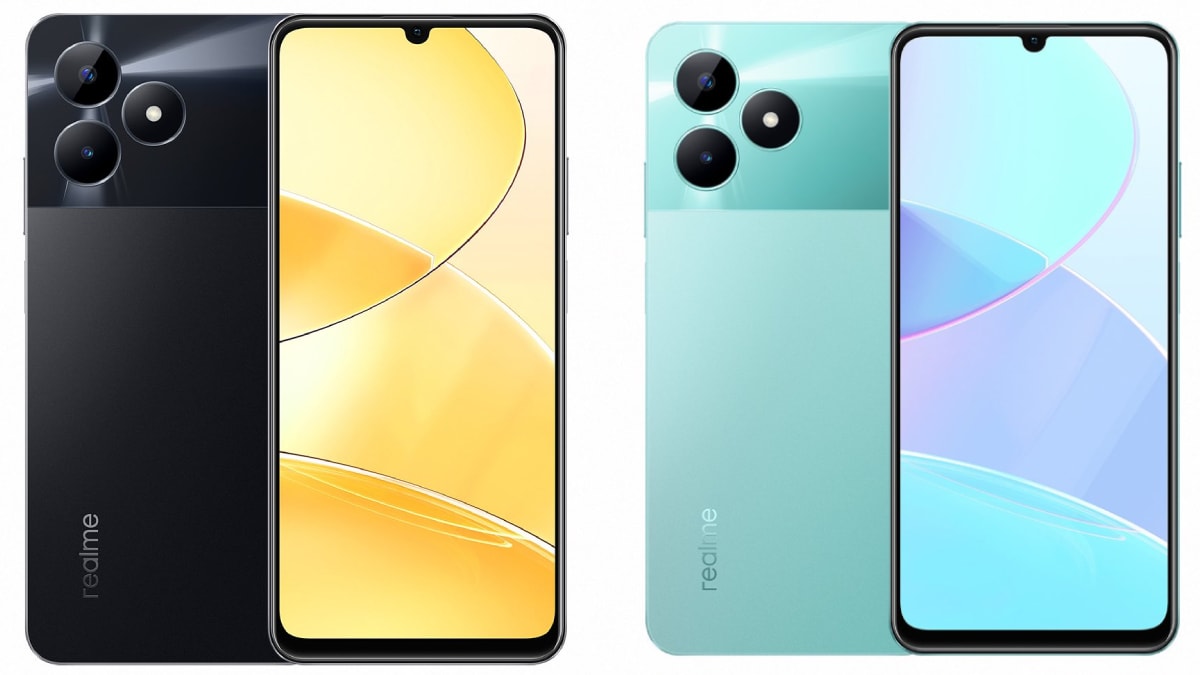
Realme C51 is inching towards its launch in India as its renders and key specifications have surfaced on the Web. The leaked renders suggest carbon black and mint green shades for the upcoming Realme C-series handset. It is shown to have a waterdrop-style notch display at the front to house the selfie shooter. The Realme C51 is said to run on Unisoc T612 SoC, coupled with 4GB RAM and 64GB of internal storage. It is tipped to feature 50-megapixel dual rear cameras and could be backed by a 5,000mAh battery with 33W fast charging support.

Known tipster Paras Guglani (@passionategeekz) tipped alleged renders and specifications of the Realme C51. The leaked renders show the handset in carbon black and mint green colour options with a water drop style display and minimal bezels. Like the recently launched Realme C55 and Realme Narzo N53, the upcoming device is shown to have Apple’s dynamic island-like Mini Capsule feature. It appears to have a dual rear camera setup at the back along with an LED flash. The volume rockers and the power button are seen arranged on the left edge.

realme c51 passionategeekz twitter inline Realme C51 leaked design

Photo Credit: Twitter/ @passionategeekz


As per the leak, the Realme C51 will run on Android 13-based Realme UI T-edition with a 6.7-inch LCD display and a 90Hz refresh rate. It is tipped to be powered by a Unisoc T612 SoC, coupled with 4GB of RAM and 64GB of onboard storage. The available RAM can be expanded up to 8GB through the Extended RAM feature, while the internal storage is expandable by up to 2TB via a microSD card.

For optics, the Realme C51 is said to pack a dual rear camera unit, comprising a 50-megapixel primary sensor and an 8-megapixel secondary shooter. For selfies, it might get a 5-megapixel camera on the front. It is said to ship with a 5,000mAh battery with support for 33W fast charging. It might feature a fingerprint sensor and a 3.5mm headphone jack.

However, Realme is yet to confirm the launch of Realme C51. The phone earlier appeared on multiple certification websites including Thailand’s National Broadcasting and Telecommunications Commission (NBTC), Eurasian Economic Commission (EEC), Indonesia’s Tingkat Komponen Dalam Negeri (TKDN), and TUV Rheinland with model number RMX3830. It was earlier spotted on the BIS (Bureau of Indian Standards) website as well.


Affiliate links may be automatically generated – see our ethics statement for details.


[ad_2]

Source link